Swagbucks: Uber Offer

For those of you looking to earn extra money, driving for Uber may be the opportunity you’re looking for! You set your own hours so you can earn as much or as little as you want! Thanks to Swagbucks, you can get paid to try it out!

Just for signing up, you’ll get 1250 SB (the equivalent of over $12 in gift cards to places like Amazon, Starbucks, Target, Walmart, and more, or just PayPal cash)! Once you take your first paid passenger, you’ll get another 8000 SB ($80!) in addition to your earnings from driving. Click here to get started.

What’s more, if you sign up through me and complete even the first part of this offer before November 1st, you’ll get another $3 bonus (300 SB) in the first week of November. So we’re talking about almost $100 in free gift cards just for making even more money on the side. Another great way to make a little extra is through Swagbucks – they have a lot of different ways you can earn free gift cards every day!

Swagbucks for Halloween!

Who doesn’t love a good challenge? Especially when you can get points to redeem towards free gift cards!

Swagbucks, a website where you can earn cash back on everyday tasks you do online is hosting a Halloween Team Challenge. It starts on Monday, October 24th at 8am PST and goes through Friday so you have a whole week to contribute points to your assigned team.
How will you contribute? Watching videos, completing surveys, shopping online? These activities and more will help your team get ahead. If you’ve never used Swagbucks before, now is a great time to join, especially if you participate in the Team Challenge because it’s an opportunity to win an extra bonus for trying out the site.

All members who participate and contribute at least 400 SB to their team’s total will receive an SB bonus in the form of a rebate on their next gift card! I can’t wait to help my team come in 1st place for that 50 SB rebate. 


Swagbucks – Target Card

Here’s a new Swagbucks offer for you!

If you shop at Target a lot, you can get $6 in gift cards (paid out in SB points) when you get approved for the Target REDCard. When you use that card, you also get 5% off, free shipping & 30 extra days for returns when you shop with your REDCard. The 600 SB points will credit immediately!

This is a limited time offer – to get the $6 bonus, you need to complete the offer before Saturday, October 22nd!

Click here to get started. If you’re already a Swagbucks member, be sure to use the same info that you have in your Swagbucks account when you apply. If you’re not a member yet, sign up for Swagbucks using the link I gave you and when you complete the offer, you’ll earn a $3 (300 SB) bonus that will be applied to your account in the beginning of November. That means you’ll have at least $9 worth of SB points!

Haven’t heard of Swagbucks? It’s a site where you earn points (called SB) for doing things you already do online, like shopping, watching videos, and discovering deals like this one. Then you turn those points into PayPal cash or gift cards from places like Target, Amazon, Walmart, Starbucks, and more!


I'm a Swagbucks Influencer - Start Earning Now

Swagbucks Offer (SIM Cards)

As you know, I love points.  So I figured I’d share this offer with those of you who also love points!

Swagbucks, the online rewards site that puts cash back in your wallet, has an AMAZING offer through FreedomPop where you get $5 (paid in the form of 500 SB) when you buy a SIM card for just $0.99!  FreedomPop’s Global 3-in-1 SIM gives you free voice, text, and data in the US *and 25 other counties). Buy the $0.99 SIM card, get your first month of FreedomPop for free, and earn 500 SB. If you stay subscribed for 3 months, you’ll get an additional 1000 SB!

This deal is running for a limited time, so use this link and get yours before Saturday, October 22nd! It’s a zero-risk offer that pays you to try out a new, less expensive way to use your mobile phone.

Haven’t tried Swagbucks yet? This is a great way to do it, and when you sign up through me using the link above and get your 500 SB, you’ll get a bonus 300 SB at the beginning of November. So that’s $5 for trying FreedomPop, which gets you 800 total SB, which you can turn into $8 worth of gift cards! That’s in addition to all the other SB you’ll earn as you use the site.


I'm a Swagbucks Influencer - Start Earning Now

Swagbucks for Wine Lovers

Good news for wine lovers! You can get paid to build up your collection through this special offer from Winc and Swagbucks.

Winc is a great site that matches wines to your palate. Don’t like a bottle they send you? No problem – they have a 100% satisfaction guarantee. You can get new wines delivered to your door every month, or skip a month if you feel like it. Plus, if you order 4 or more bottles, shipping is free!

On top of all that, Swagbucks wants to give you up to $40 for checking them out (paid out in the form of SB points)! Sign-up & earn 2,000 SB on your first order. Stay subscribed for a second wine shipment & earn an additional 2,000 SB. Please click here for complete details and to get started!

If you haven’t tried Swagbucks yet, this is a great time to start! Signing up through me and then completing the first half of this offer and getting the 2000 SB entitles you to a bonus 300 SB. If you complete a survey through Swagbucks before November 1st, that’s another 100 SB bonus. That means you can get a total of $44 worth of SB for trying out Winc, then turn those SB into gift cards to places like Amazon, Starbucks, Walmart, and Target, or get PayPal cash!

Swagbucks Offers Bluehost for $1.

I freaking love Swagbucks!

Swagbucks (the online rewards site that puts cash back in your wallet) has an AMAZING offer through Bluehost where you get 3500 SB (which is the equivalent of $35 in gift cards) for signing up.

Bluehost is a leading web solutions services provider. You can try it out for 12 months at a special discounted price of $2.95/mo AND get a free domain in addition to 3500 SB by using this link before Friday, October 14th – that means you get everything for just $1!

It’s the perfect opportunity if you need to make a host change to your website or if you’ve been thinking about starting a website or blog.

Haven’t tried Swagbucks yet? This is a great way to do it, and when you sign up through the link above and get your 3500 SB, you’ll get a bonus 300 SB at the beginning of November.

So that’s $35 for trying Bluehost, which gets you 3800 SB, which you can turn into $38 worth of gift cards!

Swagbucks Online Treasure Hunt!

As someone who LOVES points, it would be remiss if I did not share this points earning opportunity!

Swagbucks, a cash back rewards website, is hosting a Swagenger Haunt starting today! It’s essentially on online scavenger hunt where you follow clues via their search engine to earn points called SB which you can redeem for gift cards! It’s a great opportunity to try out Swagbucks if you haven’t already.

Each day, for 5 days, 10 winners of 500 SB will be chosen! Come back each day at 10am PDT/1pm EDT for new clues because you can win more than once. Have fun participating in this spooky Swagenger Haunt!

Happy Searching!

5 Things You Should Never Post on Social Media

Things You Should Never Post on Facebook/Social Media

Some information is just nobody’s business. People post tons of personal information about themselves online, including photos and email addresses to get free promotions or download discount coupons.

Even if you correctly configure your “privacy settings,” your friend’s account could be hacked – which, in turn, affects you.

Here are five things that the pros state that should NEVER post on your Facebook page:

1. Your full birthdate – while we all love to get Happy Birthday wishes from family and friends, the problem is that with just 3 or 4 pieces of information, you could become a victim of identity theft. It’s suggested that you list your birthdate a day before or a day after the REAL date and never post the year you were born. Even if the “date” is off by a day or two, your true friends and family will know your actual birthdate.

2. Your relationship status – Stalkers love to know that you just became “newly single” or list yourself as “single,” since it’s a sign that you might be home alone. If they know who you are (or where you live or work) , they might follow you home from work.

3. Your current location – Lots of people tag themselves to let others know where they are—on vacation, at a concert, a restaurant—which lets the world know that you are NOT AT HOME. It gives thieves time to rob your home. The pros state that you should post how awesome the concert was, or upload your vacation photos, AFTER you get home.

4.  That fact that you are home alone – I’ve read Facebook posts where a person says “my family is out shopping for the day and I finally I’m alone and can finish my book.” You may think that your friends are the only ones that have access to your status, but you really have no idea who is reading your posts.

5.  Tagging your children’s pictures with their names – This type of information can be used by predators to lure your child, since they already know their name, including names of relatives or friends on your Facebook page. Your child may think this person is “safe” because they know details about their family that they use to try to build rapport with your child.

These are just a few of the “never’s” that I am sharing with you.

Question: What other things would you recommend NOT posting on Facebook so I can add them to my list?


Twits 2K aka Lists are Fun!

I just reached 2,000 followers! Woot!

On August 8, 2015, I began my Twitter journey with 426 Followers. If you have read my earlier posts, you know that this number represents my total lack of effort at actually forming a Twitter “presence”. I had this bright idea to sit back and see how many new Twitter followers I would gain NATURALLY – no actual promotion or pleading or paying attention on my end.

Yeah, that didn’t work.

By March 30, 2016, my Follower count had increased to 669. That’s less than 300 new followers in eight months…no bueno! This was taking too long. I decided to stir things up a bit. It was time to research and test out some Twitter strategies and see if they make a difference. (Answer: they do.)

So I started researching how to build an audience and keep them engaged. I’ve been testing out some of the tools available and learning new ways to engage with my current followers, while increasing visibility of my profile to attract new Twits.

Strategy #1. Follow Your Followers.
Strategy #2: Using an Account Manager.
Strategy #3: Make Some Twiends.

So now that I have a decent number of Followers, it’s time for Strategy #4: Understanding Lists.

Twitter Lists are useful, helpful, and effective for managing and optimizing your Twitter experience. A Twitter List is simply a way of categorizing people you “follow” on Twitter into specific groups, making it easier to find tweets from the users that are important to you, in a streamlined manner. Viewing a List will show you a stream of Tweets from only the accounts on that list.

Two very important things to know:
1. You don’t have to be following a user in order to add him or her to a list.
2. Tweets from your lists do not show up in your primary feed.

If you find Twitter accounts that you are interested in reading from time to time, but you don’t want to see every single tweet in your primary stream, you can put them into a List and read those tweets when the time is right for you.

Creating a Twitter list is fairly simple. Simply go to https://twitter.com//lists, and then on “create new list.” Twitter lists can be public (visible to everyone and searchable on Google) and private (visible only to you). You can create your own lists or subscribe to lists created by others. You can have up to 1,000 Twitter lists and each list can be up to 5,000 users long. You do not have to be following a user to add them to a list.

So here’s the breakdown:

Lists are good. You can use Lists to get organized, follow relevant & influential people in your industry, recommend cool accounts and engage with others. Lists are useful for organizing your Twitter streams based on your interests, and they are definitely worth trying if you want to streamline your account.

I NEED SOME HELP NOW PEOPLE.

Now that I’ve covered Account Managers, Twiends, and Twitter Lists, what else is out there that can help grow my audience or streamline my account? Please let me know in the Comments!

I guess it’s time to hit the books and find some new strategies to increase my Twitter presence … next post will be when I hit 3000!

Twits Plus Twiends

My Personal Guide to Increasing my Twitter Followers is shaping up quite nicely! Instead of just doing nothing and waiting for organic followers, I’m testing out some of the tools available and learning new ways to engage with my current followers, while increasing visibility of my profile to attract new Twits.

I started with Strategy #1. Follow Your Followers.

This was followed by Strategy #2: Using an Account Manager.

Now it’s on to Strategy #3: Make Some Twiends.

So the most fabulous service offered to grow your Twitter following is Twiends – hands down. Twiends is a discovery tool and community-building service that helps users to grow their Twitter audience and reach. The site is generally well regarded – plus it’s fast and free! I joined in April 2016 and within 30 days my follower count rose from 669 to 1474 (as I am writing this I just received a new follower!). Currently, I am averaging 15 – 25 new followers daily, with a little over 60% retention.

Now, I read a lot about Twiends before joining. First, I wanted to make sure it was for real. I researched the company and read through the frequently asked questions. I checked out review sites for more information. I did my due diligence. Second, I made sure that Twiends did not violate any of Twitter’s service guidelines (it does not). Third, I played around with the free portion of the service to figure out how it worked. And finally, I researched Twiends follower retention.

Here is what you need to know:

1. Your Twiends network is based on Impressions.

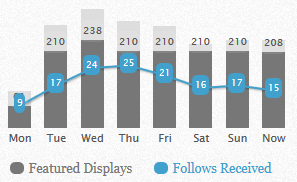
An Impression is an ad display – similar to putting yourself up on a big billboard – with the goal that people will see you and choose to follow you. Twiends also acts as a directory based on interests, so you know who you are connecting with based upon their Impression. By hovering over an Impression, you can see the person’s profile, their friend-to-follower ratio, and their latest tweet.

Being active on Twiends (following new people) increases the number of Impressions you get organically on the site. You can get a nice amount of followers just by being active. I found that there was a 1 in 3 chance that when I added a new connection, I received a new connection.

You can also “feature” yourself by buying Impressions, and choosing how you want the number of impressions to be allocated throughout the day. Note: I added a Featured Impression subscription, and I love it – but I still make sure to follow new people with similar interests on a daily basis.
twiends

2. Twiends followers are definitely worth having.

I read that many of the followers obtained through Twiends are “not worth having”. Sure, I was following new people and they were following me – but did they remain my loyal followers or did I lose them after a day or two?

I found that many of the new followers I picked up are still around, and engaged! This is partly due to my amazing tweeting skills (of course) and partly to the Twiends feature that lets you view and follow people with similar interests. Sure I got a few spam accounts following me, but who doesn’t? Out of the 805 new followers I have gained, less than 40 were spam accounts (I checked this through TwitterAudit).

3. Integrate other tools to get the most out of Twiends.

Overall, I found that while a portion of people will unfollow fairly quickly, there are others around that are in it for the long haul. If you really want to make sure that you are not following someone who unfollowed you, it’s easy to check and unfollow them right back with CrowdFire – super simple and also free – simply check your ‘Recent Unfollowers’ daily and remove the offending follow. TwitterAudit aka Audit Your Followers (also free) allows you to discover just how many fake accounts are following you, and block those users.

4. Follow back – but not everyone!

It is important to follow back – but only if you are truly interested in that persons activity. In order to gain the followers you want, BE the type of follower you want! Twiends allows you to see the person’s account profile and their latest tweet right from the dashboard. Everyone wants tons of people following them, but many don’t actually want to follow anyone in return. You can quickly see if someone is by looking at their friend/follower ratios. If their follower count is significantly larger than their friend count, it’s pretty clear that they don’t follow back and probably unfollow very quickly.

Many people expect you to follow them back, and if you do not reciprocate, they will quickly disappear. Some will DM you asking for a follow back (I usually respond directly to these people and follow them – they cared enough to reach out, so it doesn’t hurt to be courteous.) But it does no good to follow every follower if you are just not interested in what they are about.  I follow back about 40% of those who follow me, but only if I am not opposed to reading their tweets!

And that brings me to the Breakdown:

I learned that Twiends are good to have, stay active to generate organic impressions, use tools to deal with your new followers, and only follow accounts that truly interest you. Twiends is working out for me, and I find it to be a great service.

Time to move on to Strategy #4: Twitter Upkeep. In order to keep your audience engaged and your timeline looking fresh, you have to stay on top of your Twitter account. In my next post, I will discuss several tools you can use to clean up and streamline your account. If you want to tag along with me, you can either email me directly or tell everyone about your experience in the Comments!